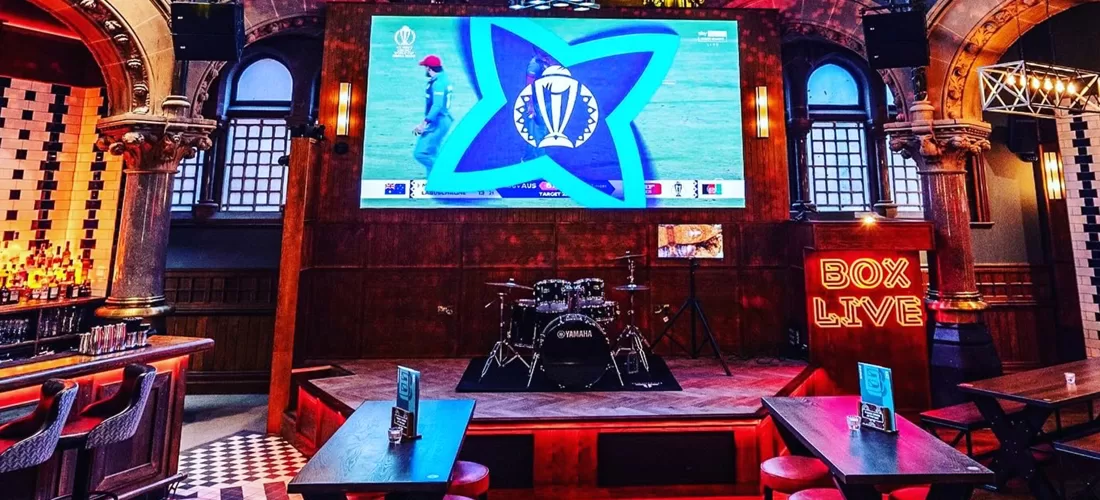
Key decision factors and how they affect your venue
2) Brightness and ambient light: LED panels typically offer higher nits than direct‑view LCDs, making them better for sunlit atriums or venues with bright stage lighting. Commercial TVs can struggle with glare in those conditions unless fitted with specialist anti‑glare glazing or shading.
3) Screen size and seamless joins: If you need a single seamless canvas exceeding the largest commercially available TV (~98"), LED modules are the practical choice. TVs will show bezels between units, which may be acceptable for tiled multi‑screen matrices but not for feature visuals.
4) Content type and source integration: If your content is mixed — live broadcast, signage, camera feeds, media players — both options can work. LED walls often require specialised video processors and scalers (eg Novastar, Brompton) and may need SMPTE/SDI or fibre links. Commercial TVs with OPS/HDMI inputs are simpler to drive and easier to swap.
5) Structural and installation constraints: LED walls are modular and can be built to fit irregular surfaces but require precise supporting structure, cabling access and ventilated equipment racks. TVs mount on standard brackets and usually need less bespoke structural work.
6) Maintenance and serviceability: LEDs offer module‑level replacement; a faulty module can be swapped with minimal downtime if spare parts and access are planned. TVs are replaced as whole units. Consider access for lifts/scaffolds and whether you need on‑site spares or a repair contract.
7) Lifetime and total cost of ownership (TCO): LEDs often have longer useful life in 24/7 signage scenarios and can be more energy efficient at scale, but have higher up‑front costs and require professional maintenance plans. TVs have lower initial cost but may need more frequent replacement in heavy‑use commercial environments.
Technical workflow: from specification to commissioning
2) Display selection and pixel pitch calculation: For LED choose a pixel pitch that provides at least 30–40 pixels per degree at typical viewing distances. For TVs, choose panel size and resolution that match the closest viewing positions and content type (HD vs 4K).
3) Structural and electrical design: LED walls require load calculations, access panels for module servicing and controlled ventilation. Commercial TV installations focus on secure brackets, power/POE management and cable concealment.
4) AV signal, processing and control integration: LED walls typically need video processors/scalers and often integrate with control systems (Crestron/AMX/ClearOne or custom solutions). TVs may be driven via HDMI/OPS or networked signage players with cloud management. Plan for audio routing and sync if paired with live content.
5) Installation and alignment: LED modules are aligned and colour‑calibrated on site; TVs typically require basic calibration and picture settings. Record calibration presets and take reference photos.
6) Commissioning and handover: Deliver test patterns, brightness/gamma targets, operational documentation and training for on‑site staff. Provide spares list and a maintenance schedule.
Operational constraints, maintenance and risk considerations
2) Fault tolerance and redundancy: For mission‑critical displays (events, live sport), design redundancy into processors and source feeds. LED systems can be built with redundancy planes; TVs usually rely on source redundancy (extra players).
3) Spare parts and service contracts: Ensure module spares, power supplies and processor backups are available for LED walls. For TVs consider stocking an off‑the‑shelf replacement or a rapid swap service. Pro Technical offers maintenance and repair services — see Pro Service & Repairs (repair and service centre) and Onsite AV Repair (/onsite-service.html) for options.
4) Regulatory and safety compliance: All fixed installations must meet local building and electrical codes. LEDs require correct mounting and access provisions for safe servicing.
5) Image uniformity and ageing: Over years, LED modules and TV backlights age differently. Implement scheduled colour calibration and firmware updates to maintain consistency.
Cost drivers and commercial planning (non‑price guidance)
- Structural works: bespoke frames, false walls, access platforms.
- Signal processing: LED video processors, routing matrices, SDI/IP conversion.
- Power and cooling upgrades: larger LED walls may require dedicated circuits and ventilation.
- Installation labour and commissioning: module alignment, multi‑screen calibration and testing.
- Maintenance and spares provision: module or unit spares and regular calibration visits.
When planning ROI, consider how the display will support revenue drivers (promotions, advertising, live events) and the expected service life of the chosen technology. For guidance on wider AV project costs and scope see our resource 'How much does commercial AV installation cost?' (/resources/how-much-does-commercial-av-installation-cost).
Selecting a supplier and integration partners
- Provide module‑level service and spare parts.
- Integrate processors and control systems into the venue’s AV backbone.
- Provide on‑site calibration and long‑term support options.
For commercial TVs prioritise installers who can manage secure mounting, cable containment, and networked signage management. Pro Technical installs LED pixel systems and custom AV control systems; see LED pixel systems (/led-pixel-systems/) and Custom AV control systems (/custom-av-control/) for related services and case studies.
Quick decision checklist for venue managers
- Is a single uninterrupted canvas essential? (Yes → LED)
- Are viewing distances mostly close (under 3m)? (Yes → TV or fine‑pitch LED)
- Is high ambient brightness a regular condition? (Yes → LED)
- Will you require bespoke shapes, curved surfaces or very large sizes? (Yes → LED)
- Do you need simple source inputs and quick replacements? (Yes → Commercial TV)
- Are maintenance access and spare‑part logistics constrained? (If yes, consider TVs or ensure LED supplier provides module spares and service)
If you’re undecided, arrange a site survey and mock‑up; physical samples and test patterns in situ reveal whether pixel structure, brightness and viewing angles meet expectations.